
















This guide is for IT leaders, security teams, and vulnerability management professionals looking to strengthen risk detection and remediation efforts in 2026. It covers the best vulnerability scanning tools and the key capabilities organizations should evaluate to improve visibility across networks, endpoints, cloud environments, and web applications.
Key points about vulnerability scanning tools in 2026
- Vulnerability scanning tools help organizations identify missing patches, misconfigurations, exposed applications, and network security weaknesses before attackers exploit them.
- Modern vulnerability scanners provide actionable remediation guidance, severity scoring, and integrations with IT and security workflows.
- Leading tools like Tenable, Wiz, Invicti, and Nmap support a wide range of environments, including networks, cloud infrastructure, containers, and web applications.
- Organizations often use multiple vulnerability scanning tools to improve coverage across endpoints, applications, and cloud assets.
- Effective vulnerability scanning strengthens overall security posture by helping teams continuously detect, prioritize, and remediate risks.
Vulnerability scanning (vulscan) tools scan assets to identify missing patches, misconfigurations, exposed application vulnerabilities, and network security issues to be remediated. The top vulscan tools provide actionable lists of vulnerabilities and the context to understand their significance, such as the type of vulnerability and its severity, bolstering your overall security posture. To help you select the best-fitting vulnerability scanning solution, we’ve evaluated the top options and their use cases.
The seven top vulscan tools to consider are:
- Tenable: Best overall vulnerability scanner and enterprise vulscan option
- Invicti: Best for comprehensive website and application (webapp) scans
- StackHawk: Best entry-level webapp scanner for small DevOps teams
- Nmap: Best open-source tool for free IT infrastructure and port scanning
- ConnectSecure: Best basic infrastructure scanning for service providers
- Vulnerability Manager Plus: Best entry-level endpoint and server scanner
- Wiz: Best specialist tool for clouds, containers, and infrastructure as code
Top Vulnerability Scanning Tools Compared
Explore each tool’s scanning options and other key aspects below:
| Vulnerability Scanner | VulScans Performed | Complexity | Agent | Key Features |
|---|---|---|---|---|
| Tenable | • Network, Endpoint, and Server • Website and Application • IoT | High, but reduced by pre-configured templates | Optional | • Scans more than 47,000 unique assets and apps • Tenable research often adds zero-day vulns |
| Invicti | Website and Application | High | None | • Automatic and continuous scans • DAST, IAST, and SCA testing |
| StackHawk | Website and Application | Low (focused DAST tool) | None | • Offers unlimited free DAST scans for one app • CI/CD, Slack, and GitHub integration |
| Nmap | Network, Endpoint, and Server | High, but simplified by a script library | None | • Quick host discovery • Free tool |
| ConnectSecure | Network, Endpoint, and Server | Low (focused IT Infrastructure tool) | Yes | • Multi-tenant scanning and reporting • Automated alerts and ticket generation |
| Vulnerability Manager Plus | Network, Endpoint, and Server | Low (focused IT Infrastructure tool) | Yes | • Scans devices for end-of-life, peer-to-peer, and third-party software vulnerabilities • Offers a free tier |
| Wiz | Cloud and Container | Low (focused IT Infrastructure tool) | No | • Native cloud and Kubernetes vulnerability scanner • Scans infrastructure-as-code (IaC) |
For more details about creating this top seven list, read about our selection process below.

Tenable – Best Overall & Most Integrated Enterprise Vulnerability Scanning Tool
Tenable builds on the popular Nessus vulnerability scanning tool to deliver integrated enterprise-scale vulnerability detection that evaluates 47,000 unique IT, IoT, OT, operating systems, and applications. It provides consolidated capabilities for network security and website and application (web app) vulnerability scanning, backed by proprietary research that discovers zero-day vulnerabilities and powers its proprietary threat intelligence feed.
Pros
Cons
Tenable provides their products based on annual subscriptions with multi-year discounts. They offer Nessus network vulnerability in three versions and a separate license for web application scanning.
- Tenable Web App Scanning: Starts at $6,300 per year for five domains
- Nessus Essential: Free, but only scans 16 IP addresses and doesn’t include compliance checks, content audits, or technical support
- Nessus Professional: Starts at $3,990 per year for unlimited IT and configuration assessments and has options for advanced support and on-demand training
- Nessus Expert: Starts at $5,990 per year and builds off of Nessus Professional to add external attack surface discovery, infrastructure as code (IaC) scanning, and more
Tenable provides their products based on annual subscriptions with multi-year discounts. They offer Nessus network vulnerability in three versions and a separate license for web application scanning.
- Preconfigured templates to enable quick starts
- Automatic full scans trigger with all new vulnerabilities added
- Continuous scans check vulnerabilities and compliance configurations
- Multi-tenant options and customizable templates for IT service providers
- Automated alerts for Security Incident and Event Management (SIEM) tools

For more information, read our article on enterprise vulnerability scanning tools, which compares Tenable to Intruder, Qualys, and others.

Invicti – Best Website & Application Vulnerability Scanning Tool
Invicti delivers the most comprehensive array of website and application vulnerability scans and reduces wasted time with the fewest false positives in the industry. The robust scanner offers automated on-premises or SaaS-hosted scanning that integrates with standard development pipeline tools for efficient workflows. Invicti, formerly known as Netsparker, remains the industry leader in both the diversity of web app scans and the quality of the results.
Pros
Cons
Invicti doesn’t publish pricing information but bases licenses upon the number of user seats and scanned websites. The three levels of licensing include:
- Standard: Provides on-premises installation of a desktop scanner for one user
- Team License: Provides ongoing multi-user access and provides capabilities for built-in workflow tools, PCI compliance, and asset discovery
- Enterprise: Licenses provide access to hosted and on-premises deployments as well as custom workflows and dedicated tech support
- Automated and continuous scans to update website, application, and API inventories
- DAST, IAST, and SCA options for dynamic (DAST) and interactive application security testing (IAST), as well as Software Composition Analysis (SCA) testing
- Crawls dynamic-input pages and complex paths authenticated by form submission, OAuth2, NTLM/Kerberos, multi-level forms, password-protected areas, and more
- Continuous updates regularly increase the capabilities of this enterprise tool
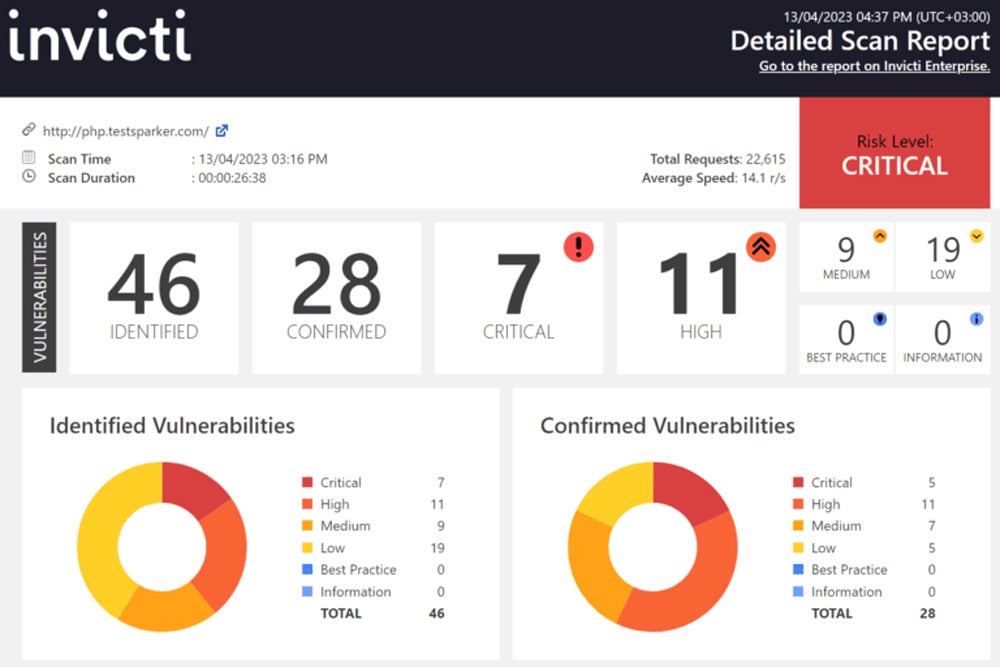
For more on the best webapp vulnerability scanning tool options, read our article comparing Invicti against AppScan, Burp Suite, and more.

StackHawk – Best Entry-Level WebApp Scanner
StackHawk offers more limited scanning options but provides a free tier to kick-start vulnerability scanning capabilities for the needs of smaller or inexperienced DevOps teams. The highly focused DAST scanner integrates with CI/CD automation and Slack to triage findings and enable rapid correction. Teams unfamiliar with webapp scanning can gain experience, develop workflows using StackHawk’s free tier, and continue using StackHawk as they grow.
Pros
Cons
Stack Hawk offers four licensing levels, which can be billed monthly. Customers can also receive discounts for annual billing.
- Free Tier: Enables DAST scanning for one application, automatable in CI/CD
- Pro Tier: Costs $42 per developer per month (minimum of five) with unlimited scanning, expanded integrations, custom test data, and either email or Slack customer support
- Enterprise Tier: Costs $59 per developer per month and adds single sign-on, role-based permissions, API access for scan results, dedicated Slack support, and an option for premiere Zoom support
- Custom pricing: With volume discounts available for large development teams
- DevSecOps integration for CI/CD, GitHub, and Slack to improve speed for remediation
- API support for REST, GraphQL, and SOAP integration and API security testing
- Custom scan discovery allows more advanced scanning options
- cURL-based reproduction criteria to reproduce alerted vulnerabilities for analysis

Articles on the best webapp vulnerability and entry-level vulnerability scanning tools suitable for small and medium-sized businesses (SMB) cover StackHawk more deeply. These articles compare StackHawk against Dastardly, Detectify, Zap, and more.
Nmap – Best Open-Source IT Infrastructure & Port Scanner
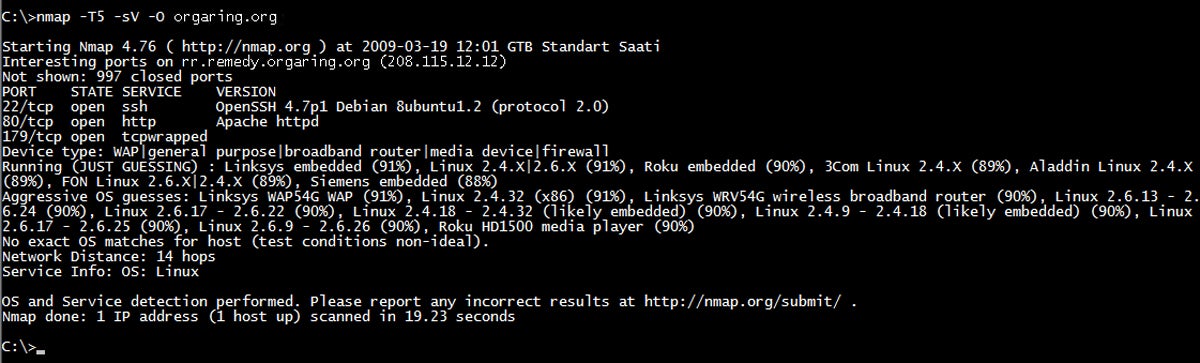
Nmap incorporates pre-configured vulnerability scanning scripts to methodically scan open ports on each IP address in a target range for potential misconfigurations and vulnerabilities. As an open-source tool, it provides a quick, free, and lightweight network security solution that can be easily incorporated into other automated deployment and scanning scripts. The favorite tool for ethical and malicious hackers, Nmap provides a glimpse of what vulnerabilities an attacker might see.
Pros
Cons
- Quick host discovery to determine available IP addresses and open ports on a network
- Uses TCP/IP stack characteristics to guess device operating systems
- 500+ developed scripts for enhanced network discovery and vulnerability assessment
- Custom Nmap scripts provide powerful automation and integration capabilities
For more information on Nmap, read our article on open-source vulnerability scanning tools that compares Nmap against OpenVAS, OpenSCAP, and more.

ConnectSecure – Best Basic Infrastructure Scanning Tool for Managed Service Providers
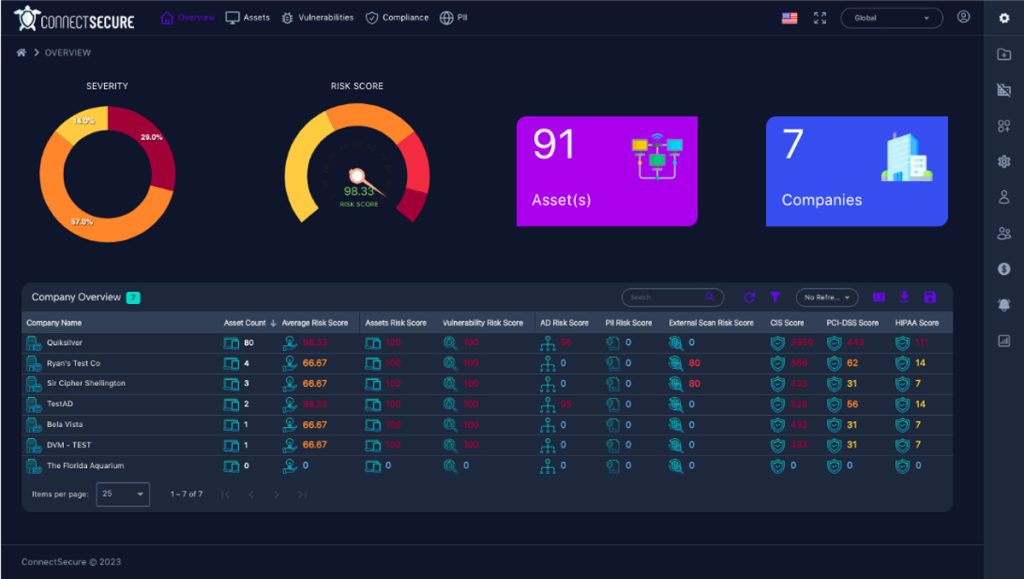
ConnectSecure is a vulnerability scanner that managed IT service providers (MSPs) and managed IT security service providers (MSSPs) select because of its flat-rate pricing, multi-tenant capabilities, and dedication to distribution through partners. It scans for vulnerabilities and compliance issues for endpoints (Windows, MacOS, Linux), servers, network equipment, printers, and mobile devices (through Mobile Device Management integration).
Pros
Cons
ConnectSecure offers a 14-day free trial and four tiers of flat-rate pricing:
- Up to 1,500 Devices: $299 per month
- 1,501 to 2,500 devices: $399 per month
- 2,501 to 5,000 devices: $599 per month
- 5,001 to 7,500 devices: $899 per month
- 7,501 to 10,000 devices: $1199 per month
- More than 10,000 devices: Contact for a quote
- Multi-tenant capabilities with prioritized multi-client reporting and role-based customized reports with white-label options
- Visual client dashboards provide easy-to-understand, customizable, and non-technical automated reports for clients
- Robust integration options with popular ticketing systems (ConnectWise, SyncroMSP, etc.) and communication tools (email, Slack, Microsoft Teams)
- Robust asset and threat management options for asset discovery, patch deployment, compliance management, and prioritization of threats and vulnerabilities
Our article on MSP/MSSP-friendly vulnerability scanning tools will also cover competitors such as RapidFire VulScan and Syxsense Security Scanner.

Vulnerability Manager Plus – Best Entry-Level Endpoint & Server Scanner
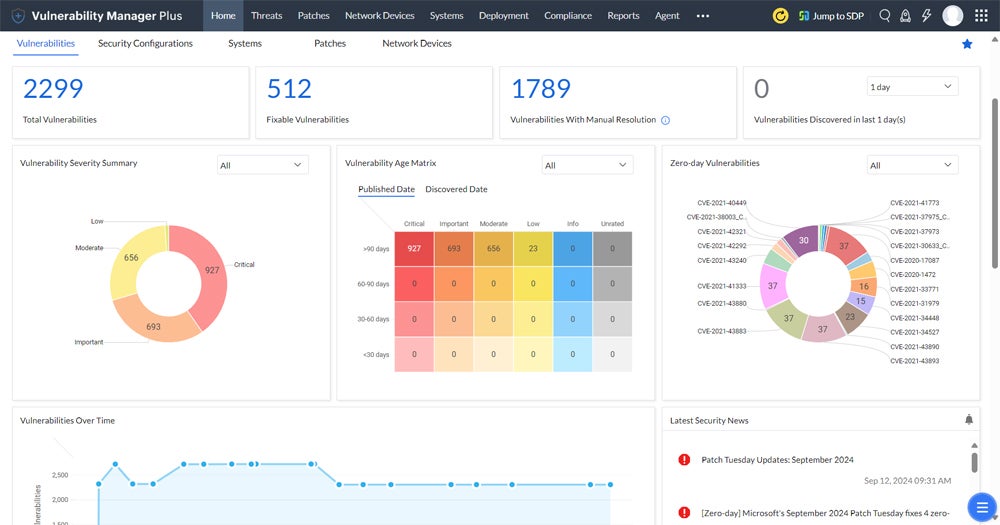
Thanks to free trials and a free tier, ManageEngine’s Vulnerability Manager Plus helps small IT teams start scanning endpoint devices and web servers for vulnerabilities with minimal investment. Integration with other ManageEngine tools enables future expansion as an organization’s sophistication and capabilities grow. The free tier allows the smallest teams to develop a vulnerability scanning and management program with assurance of support for future growth.
Pros
Cons
ManageEngine offers three editions of Vulnerability Manager Plus, all licensed annually for a single technician and with free trials available for the paid tiers. The scanning of network devices may require additional licenses.
- Vulnerability Manager Plus Free: Permits scans for up to 20 workstations and five servers
- Vulnerability Manager Plus Professional: Starts at $695 to scan up to 100 workstations
- Vulnerability Manager Plus Enterprise: Starts at $1,195 for 100 workstations and adds audit compliance, patch management, remote shutdown scheduling, and more
- Operating system and third-party software scans detect end-of-life software, peer-to-peer software, as well as unpatched vulnerabilities
- Detects setup vulnerabilities with scans for default credentials, firewall misconfigurations, open shares, and user privilege issues
- Basic web server vulnerability scanning for unused web pages, misconfigured HTTP headers/options, expired certificates, and more
Read our article on the best entry-level vulnerability scanning tools suitable for small and medium businesses (SMB) to compare Vulnerability Manager Plus against Tenable Nessus Essentials and GFI Languard.

Wiz – Best Specialist Tool for Cloud & Container Scanning
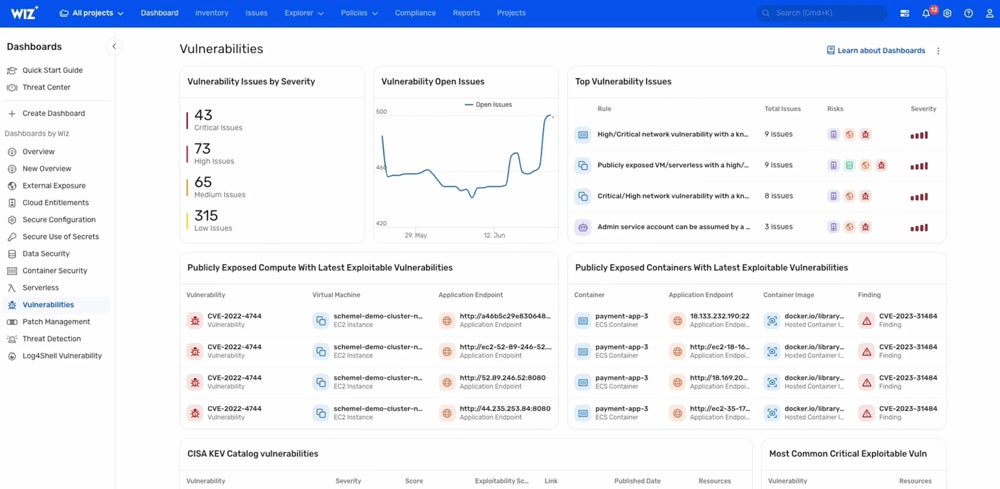
Wiz provides specialized vulnerability scanning for multi-cloud, Platform-as-a-Service (PaaS), Kubernetes containers, and other cloud infrastructure without affecting business operations or stealing resources from active workloads and processes. It natively connects to virtualized resources to provide hyper-focused vulnerability detection for the newest classes of IT assets.
Pros
Cons
Wiz doesn’t publicly list pricing but does offer custom pricing quotes based on the number of billable cloud workloads running in an environment. The AWS marketplace lists starting prices for 12-month Cloud Infrastructure Security Platform contracts as $24,000 for Wiz Essentials and $38,000 for Wiz Advanced with cloud detection, response, and other capabilities.
In our article on specialized vulnerability scanning tools for clouds and data lakes, read about other specialty solutions.
How We Evaluated the Best Vulnerability Scanners
This list of the top vulnerability scanners draws from research on the top solutions for the significant vulnerability scanning categories. Buyers searching for vulnerability scanning tools primarily seek standalone solutions that can be installed or integrated with existing security stacks and IT ticket processes.
Therefore, inclusion criteria focus primarily on stand-alone vulnerability scanning tools, although some entry-level vulnerability management tools were considered and evaluated based exclusively on their vulnerability scanning capabilities. The criteria exclude solutions incorporating vulnerability scanning features into other tools such as penetration testing, asset management, patch management, etc.
To select the best options from the remaining tools, we considered the key criteria relevant to the buying decision: scanned assets, user skill, price and licensing, scanning capabilities, integrations, and customer support.
Scanned Assets
The types of assets a vulscan tool scans provided the first criteria for segregating the tools. After all, direct comparisons between webapp and network scanners often fail because of the phenomenal differences between the scans. We segregated the tools into comparison sets based on website and application, IT infrastructure, and specialty scanning needs (IoT, cloud, container, etc.).
User Skill
User skill, sophistication, and resources became the next considerations for comparison. For example, the sophisticated needs of an international bank (enterprise) cannot be compared to the straightforward and streamlined needs of a small high school (entry-level or SMB). Additionally, we considered the specialized needs of managed service providers for multi-tenancy, customized reports, etc.
Price & Licensing
Price remains a key consideration for all buying decisions. When comparing products, we considered the price-to-features ratio, pricing transparency, availability of details for required and optional licenses, annual or volume discounts, and availability of free trials.
Scanning Capabilities
We evaluated all tools on their core scanning features, vulnerability source quality, and false positive information. We evaluated infrastructure scanners based on support to scan various devices in the modern environment, including IoT, network equipment, and containers. We compared webapp scanners based on scan type (DAST, IAST, etc.), CI/CD integration, API scans, and support for web forms, passwords, and dependencies.
Integrations
Vulnerability scanning tools must integrate with the existing process for ready adoption and deployment. For integration concerns, we considered ease of installation, administration, deployment options (SaaS, on-site, docker container, etc.), automation, and exporting vulnerabilities to existing IT ticketing systems or security incident and event management (SIEM) solutions.
Customer Support
Everyone needs help at some point, so for customer support, we considered hours of availability, diverse contact options (phone, Slack, etc.), and options for premium support. We also included support for sales channel partners under this category to consider the needs of various service providers and resellers.
Frequently Asked Questions (FAQ)
Why Are There So Many Types of Vulnerability Scanning Tools?
The first vulnerability scanners tested local network devices, and those needs remain. However, the expanding scope of IT assets drives the development of specialty vendors focusing on specific assets and enterprise vendors adding new features to their already-complicated tools.
Meanwhile, the universal need for vulnerability management leads to incorporating vulnerability scanning capabilities in other tools (penetration testing, endpoint security, etc.) or adding management and remediation capabilities to existing vulnerability scanners.
What is vulnerability scanning?
Vulnerability scanning is the process of identifying security weaknesses, missing patches, misconfigurations, and exposed services across systems, applications, networks, and cloud environments.
Why are vulnerability scanning tools important?
Vulnerability scanners help organizations proactively detect weaknesses before attackers can exploit them, reducing the risk of breaches, ransomware, and compliance violations.
What types of assets can vulnerability scanners assess?
Modern vulnerability scanners can assess networks, servers, endpoints, IoT devices, web applications, containers, cloud environments, and infrastructure-as-code (IaC) deployments.
What features should organizations look for in vulnerability scanning tools?
Key features include automated scanning, risk prioritization, remediation guidance, integrations with ticketing and SIEM tools, cloud and container support, reporting, and false-positive reduction.
Which vulnerability scanner is best for enterprise environments?
Tenable is widely recognized as a strong enterprise vulnerability scanning solution due to its broad asset coverage, advanced vulnerability intelligence, and scalable deployment options.
Which vulnerability scanner is best for web applications?
Invicti is designed for comprehensive web application scanning, supporting DAST, IAST, and software composition analysis (SCA) capabilities.
Can organizations use multiple vulnerability scanners?
Yes. Many organizations use multiple scanning tools to improve visibility across different asset types and compare results for more accurate remediation prioritization.
Are open-source vulnerability scanners still useful?
Yes. Tools like Nmap remain valuable for network discovery, port scanning, and basic vulnerability assessments, especially for smaller organizations or supplementary testing.
How often should vulnerability scans be performed?
Organizations should run vulnerability scans regularly, especially after infrastructure changes, software updates, cloud deployments, or newly disclosed vulnerabilities, to maintain an up-to-date security posture.
Is Vulnerability Scanning the Same as Patch Management?
Vulnerability scanning is not the same as patch management. Patches will correct some vulnerabilities, but others stem from misconfiguration or deliberate selection of dangerous options in firewalls, security tool settings, or writing software. Vulnerability scanning needs to be performed separately, but it can be used to confirm patch installation.
For resource-constrained teams, many tools offer free trials that can be used to test drive capabilities. When in-house vulnerability scanning proves unmanageable, consider vulnerability-management-as-a-service (VMaaS), MSPs, or MSSPs to offload the tasks and ensure critical vulnerabilities are detected and remediated quickly.
Bottom Line: Vulnerability Scanning Starts & Finishes Critical Security Processes
A strong security posture depends on quickly identifying and resolving vulnerabilities before attackers can exploit them. Vulnerability scanners start the detection process and complete the cycle with another round of scans. The final scans confirm vulnerability elimination and generate reports to prove asset security for executives, stakeholders, and compliance auditors. Vulnerability scanners help boost network security against cyber threats by proactively detecting weaknesses.
Consider how to conduct a vulnerability assessment for more insight into vulnerability assessments.
This article was published in February 2025 and updated in May 2026.