
















Think your messages are private? Think again.
Someone could be reading them. Someone could be listening to your calls. From public Wi-Fi to fake login pages, attackers have countless ways to slip between you and the person you’re communicating with, without you ever knowing. Without a trusted messaging app, you’re leaving the door wide open.
But with so many platforms claiming to offer privacy, it’s difficult to know which ones actually deliver. That’s why I’ve reviewed and compared today’s most trusted messaging tools to find the ones genuinely built for real-world threats, not just marketing claims.
Here are my top picks for the best secure messaging apps:
- EXTRA SAFE: Best for no-trace video conferencing
- Messenger: Best for encrypted social messaging
- Signal: Best for maximum messaging privacy
- Threema: Best for metadata-free communications
- WhatsApp: Best for global encrypted messaging
- Wire: Best for secure enterprise collaboration
Secure messaging app comparison table
To help you find the right fit at a glance, the secure messaging app comparison table below outlines how each tool stacks up across privacy, accessibility, and adoption.
| Secure Messaging Apps | Security Features | Platforms | Best For | Free? |
|---|---|---|---|---|
| EXTRA SAFE | E2EE, no data retention, blockchain tech, no registration, browser-based ephemeral chats | Web (native apps in development) | No-trace video conferencing | ✅ |
| Messenger | E2EE, AI assistant, spam/phishing detection | Android, iOS, Web, Windows, macOS | Encrypted social messaging | ✅ |
| Signal | E2EE, open-source, disappearing messages, no metadata retention | Android, iOS, Windows, macOS, Linux | Maximum messaging privacy | ✅ |
| Threema | E2EE, no phone/email required, minimal metadata, Swiss data protection compliance | Android, iOS, Web, Windows, macOS, Linux | Metadata-free communications | ❌ |
| E2EE, two-step verification, disappearing messages, encrypted backups | Android, iOS, Web, Windows, macOS | Global encrypted messaging | ✅ | |
| Wire | E2EE, open-source, forward secrecy, post-quantum readiness, enterprise compliance | Android, iOS, Windows, macOS, Linux, Web | Secure enterprise collaboration | ✅ |

EXTRA SAFE: Best for no-trace video conferencing
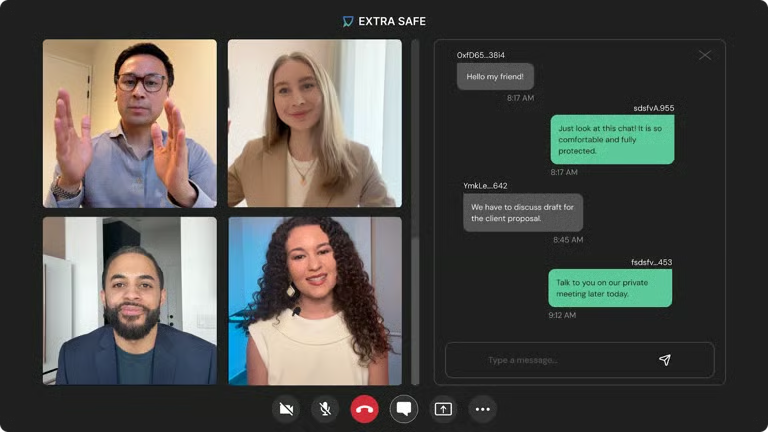
EXTRA SAFE is one of the best secure messaging apps for its cutting-edge approach to privacy and end-to-end encryption (E2EE). It uses blockchain-level cryptography and decentralized peer-to-peer connections to power secure video calls and messaging: with no accounts, no servers, and no stored data. Plus, it’s completely free.
By generating encryption keys locally and routing all traffic via WebRTC, EXTRA SAFE brings a true zero-trace experience that’s unmatched in anonymity. It’s still new and browser-based, with native apps currently in development to expand its accessibility and user experience.
Key features
- Web-based encrypted video and voice calls
- No sign-up, no personal data, no stored logs
- Built-in messaging, screen sharing, and file transfers with E2EE
- Blockchain-grade encryption keys generated on-device
Interface
Why I like it
Although it’s relatively new, I highly recommend EXTRA SAFE because it’s the only messaging app on this list that allows you to jump into a secure call instantly without downloading anything, registering, or even leaving behind metadata.

Messenger: Best for encrypted social messaging
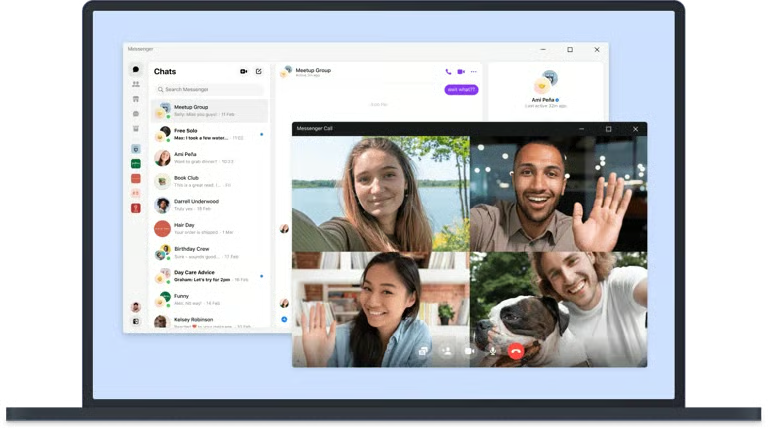
Messenger is one of the most familiar messaging apps out there, especially if you already use Facebook. Without spending anything, you can access rich media features, group chats, voice/video calls, and AI-powered tools like smart replies, all in one place.
In-app communications are end-to-end encrypted by default, allowing you to connect socially with greater confidence. Messenger’s security features include disappearing messages and device verification that add another layer of privacy.
Key features
- Integrates seamlessly with Facebook
- Free voice/video calls, chat themes, reactions, and games
- Cross-device messaging on mobile and desktop
- Built-in AI features for smart replies and business automation
Interface
Why I like it
I like Messenger because it’s one of the few mainstream apps that combines a wide reach with real encryption. Also, it lets you manage secure conversations across personal, social, and business contexts without needing multiple apps.

Signal: Best for maximum messaging privacy
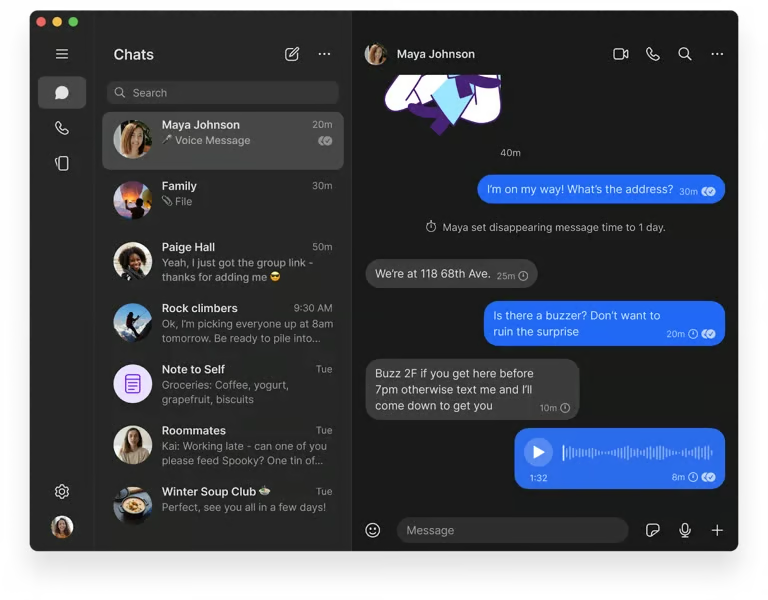
Signal’s messaging app has a privacy-first structure that uses reliable, open-source end-to-end encryption for everything, including texts, voice and video calls, group chats, and media sharing. Run by a nonprofit and funded by donations, there are no ads, trackers, or data collection in Signal.
With features like disappearing messages, screen security, and encrypted backups, this secure messaging app is trusted by journalists, activists, and everyday users who want truly private conversations.
Key features
- E2EE on messages, calls, and media
- Minimal data collection. No cloud backups, no contact syncing
- Supports disappearing messages, safety number verification, and screen security
- Available on iOS, Android, and desktop with full sync across devices
Interface
Why I like it
Signal earns my recommendation because it sets the standard for how secure messaging should be built: open-source, independently funded, and fully encrypted by default. Aside from its solid defense features, I also like that it’s operated by a nonprofit that has no financial incentive to harvest my data; that kind of integrity is hard to find.
Threema: Best for metadata-free communications
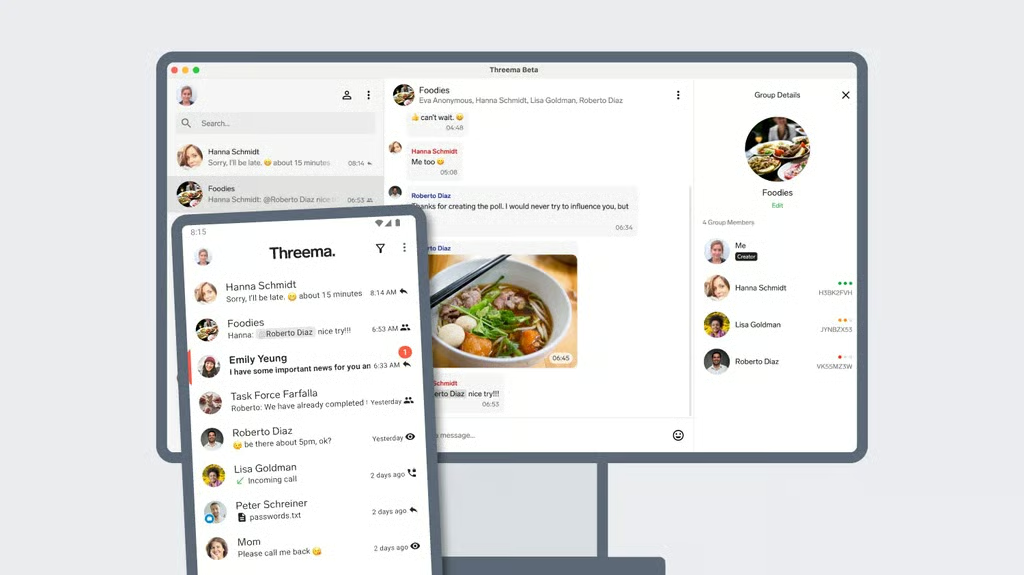
Threema is a Swiss-made secure messaging app specializing in absolute privacy and anonymity. It requires no phone number, email, or account setup. This app uses strong end-to-end encryption for all communications and avoids collecting metadata, while complying with EU data protection laws. While it’s only available as a paid app, its confidential, untraceable messaging makes it worth your money.
Threema is available as a one-time purchase of around $7 for individuals. Business plans start at about $3 per user, per month, and include management tools, broadcast messaging, and enterprise-grade support.
Key features
- Anonymous sign-up using a randomly generated ID
- End-to-end encryption for voice, video, and group communications
- Self-hosted Swiss servers with minimal metadata retention
- Threema Work for business and government-grade compliance
Interface
Why I like it
With Threema, I don’t have to share my phone number, email, or even my name. It lets me stay anonymous without losing access to essentials like group chats and encrypted voice or video calls, exactly what I need when privacy takes priority.

WhatsApp: Best for global encrypted messaging
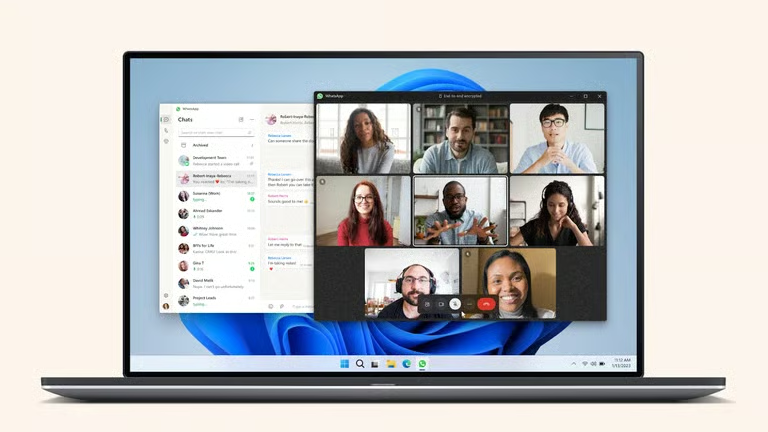
WhatsApp is a globally popular secure messaging app with default end-to-end encryption for all messages and calls. Designed for simplicity, it supports group chats, voice and video calls, file transfers, and disappearing messages, all with minimal setup. With multi-device syncing, two-step verification, and massive adoption, it’s an excellent choice for safe everyday communication and community coordination, particularly across borders.
You can use WhatsApp for personal chats at no cost. For businesses, paid plans unlock tools like chatbot automation and multi-agent support, with region-based pricing.
Key features
- E2EE for messages, calls, and media
- Group chats and broadcast lists for communities or event coordination
- File sharing up to 2GB, voice notes, and disappearing messages
- Available on mobile and desktop with multi-device sync
Interface
Why I like it
WhatsApp made it to my recommended secure messaging apps because it’s private by default and virtually everyone already has it. It’s extremely user-friendly that I can control my visibility and use two-step verification as well as disappearing messages without digging through settings.

Wire: Best for secure enterprise collaboration
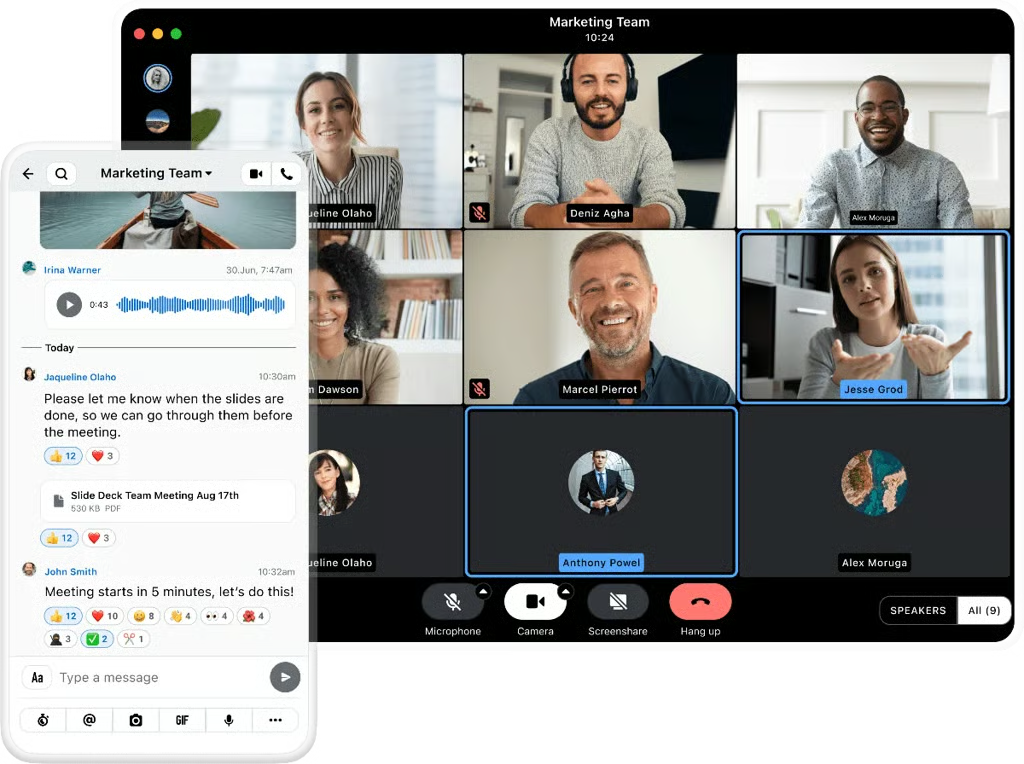
Wire is an app for secure messaging and collaboration helping businesses and teams handle sensitive data. It offers end-to-end encrypted messaging, file sharing, and screen sharing, all with robust multi-device support. This app promotes accountability with open-source protocols, compliance with GDPR, and options for on-premise hosting.
The basic version of Wire is free, while paid plans starting at $10 provide additional features like voice and video calls and business-focused security features, such as SSO.
Key features
- End-to-end encrypted messaging, file sharing, and video calls
- Multi-device support with secure syncing
- Guest rooms for inviting external partners securely
- SSO, on-premise hosting, and GDPR compliance
Interface
Why I like it
Wire is one of the few secure messaging apps developed with business and regulatory compliance in mind from the start. It gives importance to accountability, with its secure guest rooms, conversation history control, and full GDPR support features.
Honorable mentions
These apps may not be household names like Signal or WhatsApp, but they deliver compelling, specialized strengths worth exploring, especially if you’re interested in resilient, serverless messaging or strong anonymity without personal data.

Briar
Briar is built for when traditional networks fail, or surveillance is everywhere. It syncs chats directly over Bluetooth, Wi‑Fi, or USB, so you can stay connected offline or under censorship pressure. It supports private messaging and public forums, making it a go-to tool for activists, aid workers, and journalists in crisis zones.
Because it’s free and open-source, it’s a great pick if resilience and censorship resistance are top priorities for you.
Olvid

Olvid is a secure messaging app that’s all about one-on-one trust. You don’t need to share your phone number, email, or address book. Every contact is manually verified before you chat, making each conversation feel safe and intimate.
It supports encrypted text, voice, video, and file sharing on mobile and desktop, and the free version already includes E2EE and metadata secrecy. Paid plans add secure group calls and more devices if you need extra scale.
What makes a messaging app truly secure?
To be considered truly secure, a messaging app should have these important privacy and security features:
- End-to-end encryption (E2EE): Ensures only you and your recipient can read messages, not even the app provider can access them.
- Open-source code or security audits: Allows the security community to inspect how the app handles encryption and user data.
- Minimal data collection: Avoids logging who you message, when, and from where, keeping your communication patterns private.
- No phone number or email required: Lets you use the app without exposing your identity or linking messages to personal accounts.
- Zero-knowledge architecture: Encrypts all data so that even the service provider cannot access your messages, files, or contact lists.
Additional tools to support your secure messaging apps
Even the best secure messaging apps only cover part of the privacy equation. In 2024, over 10,000 confirmed data breaches were reported worldwide, with nearly 1 in 5 involved man-in-the-middle (MiTM) attacks, the kind encryption software prevents. Using a safe messaging app is a good first step, but staying private also means protecting how you connect, store files, and log in.
The security tools below support your secure messaging app by protecting the rest:
- Keeper: Stores unique passwords and adds two-factor authentication to keep your messaging accounts locked down.
- Surfshark VPN: Hides your IP address and encrypts your internet connection, keeping your chats private on public or restricted networks.
- Internxt: Lets you store and share files with end-to-end encryption, so sensitive documents stay secure even outside your chat apps.
SEE: Quick Glossary: Cybersecurity Countermeasures (TechRepublic Premium)
Methodology
To build this list of the best secure messaging apps, I focused on platforms widely trusted for private communication, along with newer options gaining attention for stronger privacy and security features. My goal was to identify tools that not only promise secure messaging, but also hold up in real-world use.
Each app was assessed using consistent criteria that reflect how people actually compare messaging platforms, including the following categories:
Privacy and security: I looked at whether end-to-end encryption is enabled by default, how much user data each app collects, whether sign-up requires personal information, and how transparent the company is about its security practices.
Core features: I evaluated the communication tools that matter most in everyday use, including text messaging, voice and video calls, file sharing, group chats, and multi-device access.
Ease of use: I considered setup time, interface design, and how easy each app is to use for both privacy-conscious users and people who just want a secure app that works.
Transparency and trust: I reviewed whether the app is open source, has undergone independent security audits, or provides enough technical detail to back up its privacy claims.
Platform availability: I considered whether each app works across major operating systems and devices, and how well it supports communication across desktop and mobile.
Reputation and real-world credibility: I factored in each app’s standing among security experts, privacy advocates, and users to help separate genuinely trusted tools from apps relying mostly on marketing.
When possible, I also reviewed the apps through hands-on testing, product documentation, and publicly available security information.
FAQs
Can I use a messaging app without a phone number?
Yes. Messaging apps like ExtraSafe, Threema, Briar, and Olvid let you use the service without linking a phone number or email.
Do secure messaging apps support voice and video calls?
Yes. Many secure apps, including ExtraSafe, Signal, WhatsApp, and Wire encrypt voice and video calls.
Is it safe to use messaging apps on public Wi-Fi?
Yes, with a reliable end-to-end encryption in place. For extra safety, consider using a virtual private network (VPN) on public networks.
Bottomline
Having the right secure messaging app matters more than ever, with privacy violations, phishing attacks, and data breaches making headlines almost daily. I built this guide to help you spot the apps that truly protect your conversations and avoid those that just market privacy without upholding it.
In a time when your personal and professional information is constantly at risk, taking a few minutes to select the right app can make all the difference in safeguarding your privacy and peace of mind.